How to
How to Get My Instagram Password on Android


In today’s digital world, Instagram is more than just a social media platform; it’s a vital part of our daily lives. Whether it’s for staying connected with friends, growing a business, or keeping up with the latest trends, losing access to your account can be frustrating. This article will guide you on how to get your Instagram password on Android, ensuring you regain access quickly and securely. We’ll cover different methods, including using Instagram’s built-in features, Google Password Manager, and third-party solutions.
Understanding Instagram Account Security
Instagram accounts are protected by passwords that secure your personal information, photos, and data from unauthorized access. However, passwords can easily be forgotten, especially if they are complex. Common reasons users forget their Instagram passwords include not writing them down, using multiple passwords for various accounts, or simply not logging in for a while.
Methods to Retrieve Instagram Password
There are several ways to retrieve your Instagram password on an Android device. Instagram offers built-in recovery options, and you can also leverage tools like Google Password Manager or third-party password managers. It’s essential to understand each method and choose the one that works best for your situation.
Using the Forgot Password Option
The most straightforward way to recover your Instagram password is by using the “Forgot Password” feature:
- Open the Instagram app on your Android device.
- Tap on “Get help logging in” or “Forgot Password?” on the login screen.
- Enter your username, email address, or phone number linked to your account.
- Instagram will offer you recovery options: via email, SMS, or through your linked Facebook account.
- Choose your preferred method:
- Email: Instagram will send a password reset link to your registered email address.
- SMS: You’ll receive a text message with a password reset link or code.
- Follow the instructions in the email or SMS to reset your password.
This method is direct and secure, provided you have access to the registered email or phone number.
Using Google Password Manager
Google Password Manager is a built-in feature on most Android devices that can save and autofill passwords for various accounts, including Instagram. Here’s how to use it:
- Open your device’s settings and go to “Passwords & Accounts.”
- Select “Google” and then “Google Password Manager.”
- Use your device’s security features, such as fingerprint or PIN, to access saved passwords.
- Search for Instagram in the saved passwords list.
- View your Instagram password if saved.
Google Password Manager is convenient and secure, especially if you regularly use Chrome or have synced your Google account with your device.
Using Saved Passwords in Browser
Many Android users save their Instagram passwords in their browsers. If you use Chrome or another browser, you can check saved passwords with these steps:
- Open Chrome on your Android device.
- Tap on the three-dot menu and go to “Settings.”
- Navigate to “Passwords.”
- Look for Instagram in the list of saved passwords.
- Tap the eye icon next to the saved password to view it (authentication may be required).
Using saved passwords in your browser is an easy way to retrieve forgotten credentials without resetting them.
Third-Party Password Managers
If you use third-party password managers like LastPass, 1Password, or Dashlane, you can also retrieve your Instagram password from these apps. These managers store and encrypt passwords, making it easy to access them when needed. Here’s a general approach:
- Open your password manager app on Android.
- Search for Instagram in the app’s vault.
- View your saved password.
While third-party managers are secure, it’s crucial to ensure that the one you use is reliable and up-to-date with security features.
Troubleshooting Password Recovery Issues
Sometimes, users encounter issues during password recovery, such as not receiving reset emails or facing account verification problems. Here are some tips to resolve these common problems:
- Check Spam/Junk Folders: If you don’t see the reset email, it might have landed in your spam folder.
- Ensure Correct Details: Double-check that you entered the correct email or phone number linked to your account.
- Wait a While: Sometimes, it takes a few minutes for the email or SMS to arrive.
- Contact Instagram Support: If issues persist, reaching out to Instagram’s support team can provide further assistance.
How to Secure Your Instagram Account Post-Recovery
Once you’ve recovered your Instagram password, it’s essential to secure your account to prevent future issues. Here are some steps:
- Enable Two-Factor Authentication (2FA): This adds an extra layer of security by requiring a code sent to your phone whenever you log in.
- Create a Strong Password: Use a combination of letters, numbers, and symbols to create a robust password.
- Regularly Update Passwords: Change your passwords periodically to maintain security.
Preventive Measures to Avoid Future Password Loss
Preventing password loss involves a few proactive steps:
- Use Password Managers: They help store and manage passwords securely.
- Keep Contact Information Updated: Ensure your email and phone number are current on your Instagram account settings.
- Note Down Passwords: Even if you rely on digital tools, keeping a physical record of your passwords in a secure place can be helpful.
Frequently Asked Questions (FAQs)
1. Can I recover my Instagram password without an email or phone number?
Yes, you can use the Facebook login option if your account is linked to Facebook.
2. How long does it take to reset my Instagram password?
It usually takes a few minutes, but it can vary depending on email and network conditions.
3. What should I do if my account is hacked?
Immediately reset your password using the “Forgot Password” option and enable 2FA for extra security.
4. Can I use the same password for multiple accounts?
It’s not recommended; using unique passwords for different accounts enhances security.
5. What if I don’t receive the password reset email or SMS?
Check your spam folder and ensure you’re using the correct email or phone number.
6. Is it safe to use password managers for Instagram?
Yes, reputable password managers are safe and help manage your passwords effectively.
Conclusion
Recovering your Instagram password on Android doesn’t have to be a daunting task. By following the outlined methods and maintaining good password habits, you can secure your account and prevent future issues. Remember to enable two-factor authentication and regularly update your passwords for optimal security.


If you’re asking how long it takes to be a surgical tech, you’re likely trying to plan your next move with real dates in mind, when you can start school, when clinicals begin, and when you can realistically apply for jobs. The answer depends on the type of program you choose, your schedule (full-time vs part-time), whether you need prerequisite courses, and how quickly you can complete clinical requirements like immunizations and background checks. This question is especially common for people moving from medical assistant to surgical tech, because they often want to leverage prior healthcare experience to transition into the operating room without wasting time.
If you want a structured route into surgical technology training, MedicalPrep can help you turn a general goal into a step-by-step plan. MedicalPrep is a surgical tech institute focused on practical preparation and OR readiness, supporting students through training that’s aligned with real clinical expectations.
In this guide, you’ll get a clear breakdown of typical timelines, what causes delays, how to choose the fastest realistic path, and what to expect from enrollment to your first job.
The Short Reality: Most Paths Take 12–24 Months
For most students, how long it takes to be a surgical tech falls into a typical range of about 12 to 24 months, depending on the credential:
- Certificate or diploma programs often take around 12–18 months
- Associate degree programs commonly take around 18–24 months (or longer if you attend part-time)
This is not just “class time.” Surgical tech programs typically include lab instruction and clinical rotations, and clinical placement has compliance requirements that can impact the timeline.
Why the Timeline Varies So Much
When people ask how long it takes to be a surgical tech, they often assume all schools are the same. They are not. Three things usually create the biggest differences:
1) Program type and credential
Certificate/diploma programs may move faster because they focus primarily on surgical technology training. Associate degree programs include general education courses (English, math, etc.), which can extend your timeline.
2) Prerequisites and admissions steps
Some programs require anatomy/physiology or medical terminology before you start. Others build these into the first term. If prerequisites are required up front, they add time—especially if you are balancing work.
3) Clinical compliance and placement timing
Clinicals are the bridge between student and working OR professional. But they require:
- immunizations and health documentation
- background checks and drug screening
- CPR certification
- facility onboarding steps
If you wait to complete these, you can lose weeks or even a full start cycle.
The Timeline From “Today” to “First Day of Work”: A Practical Breakdown
Below is a realistic “end-to-end” pathway that answers how long it takes to be a surgical tech in a practical way.
Phase 1: Research + admissions preparation (2–8 weeks)
This phase includes:
- selecting a program track (certificate vs associate)
- gathering transcripts and documents
- completing placement testing (if required)
- applying and completing the orientation/interview steps
Students who already have healthcare documentation organized can move faster.
Phase 2: Pre-clinical compliance setup (2–10 weeks, overlaps)
This can happen while you are waiting for the program start date. It often includes:
- immunization verification (some vaccines require multiple doses)
- TB screening
- physical exam clearance
- CPR/BLS certification
- background check and drug screen
This is one of the most common “hidden timeline” areas. Programs can be ready for you, but clinical sites may not clear you until compliance is complete.
Phase 3: Program coursework + labs (6–12 months depending on track)
Your early program period usually focuses on:
- surgical asepsis and sterile technique
- instrumentation and supplies
- Anatomy basics relevant to surgery
- OR procedures and workflow
- Simulated labs to build muscle memory
Phase 4: Clinical rotations (3–9 months depending on program and scheduling)
Clinical rotations vary widely. Some programs start clinicals earlier, others later. Your schedule may include early mornings and long days, similar to real OR hours.
Phase 5: Job search + onboarding (4–10 weeks)
Some students line up offers before graduation; others take longer, depending on location and availability. Employer onboarding can include additional screenings and facility training.
Put together, it is easy to see that how long it takes to be a surgical tech is not a single number. The “real” timeline includes both training and transition into employment.
Fastest Realistic Path vs Best Long-Term Path
A key planning decision is whether you want the fastest route into the OR or a broader academic credential.
Fastest route (often certificate/diploma)
This is typically best for students who:
- want to enter the workforce quickly
- are comfortable focusing on job-ready training
- Already have some college credits or prefer not to take extra general education.
Broader credential route (associate degree)
This can be beneficial for students who:
- want a college degree for long-term advancement
- may later pursue additional roles or education
- prefer a more traditional academic structure
Either option can lead to employment. Your best choice depends on your timeline goals and career plan.
If you want a guided route into training with a practical structure, MedicalPrep can help you move forward efficiently. Medical Prep is a surgical tech institute focused on job-ready preparation, sterile technique, instrumentation, OR workflow, and clinical readiness, so you can train with clarity and reduce “avoidable delays” that often come from poor planning and scattered requirements.
For Career-Changers: Medical Assistant to Surgical Tech
If you are moving from a medical assistant to a surgical tech, you may already have strengths that reduce the adjustment period:
- comfort in clinical environments
- familiarity with patient privacy and professionalism
- experience with documentation and teamwork
- sometimes the current CPR or immunization records
However, the OR environment is different: sterile technique discipline, instrument knowledge, and surgical flow are specialized skills. You should still plan on completing full training and clinical exposure. Prior experience helps, but it does not replace surgical tech education.
The Most Common Reasons Students Get Delayed
When students ask how long it takes to be a surgical tech, they often underestimate how easily preventable delays can occur. The biggest ones include:
Missing transcripts or documentation
Transcript requests can take time, especially if you graduated years ago.
Vaccine series timelines
Hepatitis B and other requirements may need multiple doses across weeks. Waiting until the last minute can delay clinical clearance.
Background check processing
Depending on volume and location, processing can take longer than expected.
Limited program start dates
Some programs have fixed cohorts (for example, only 2–3 starts per year). If you miss one deadline, you may wait months.
Clinical slot availability
Clinical sites have limited capacity and scheduling requirements. A program with strong placement coordination can make this process smoother.
Mid-Article Note: Surgical Tech vs Surgical Assistant Timeline
Many people exploring the OR also ask: how long does it take to become a surgical assistant. The timeline varies because “surgical assistant” can refer to different roles with different education, scope, and credentialing requirements depending on your state and employer. In many settings, surgical technology is a direct pathway into the OR, while surgical assisting may require additional training beyond surgical tech preparation.
If your goal is to enter the operating room efficiently and build a stable foundation, surgical technology is often the clearer first step. After you gain OR experience, you can evaluate whether advancing toward surgical assisting makes sense in your local market.
What You Can Do Right Now to Speed Up the Timeline
If your priority is reducing the total time, here is a practical plan:
1) Choose the program type first
Decide certificate/diploma vs associate. This single decision sets the timeline framework.
2) Request transcripts immediately
Even if you are “still deciding,” request them now. It removes a common bottleneck.
3) Start compliance early
Schedule:
- physical exam
- immunization verification
- TB screening
- CPR/BLS
Even if you do not start right away, having compliance ready gives you flexibility and prevents delays later.
4) Protect your schedule for clinicals
Clinical rotations often require early hours and less scheduling flexibility. If you work, plan with your employer or adjust availability.
A Realistic Example Timeline (12–18 Month Track)
Here’s an example of how long it takes to become a surgical tech in a faster program track:
- Weeks 1–4: research, admissions, transcripts, placement steps
- Weeks 2–8: compliance (CPR, vaccines, TB, background check)
- Months 2–10: program classes + labs
- Months 7–14: clinical rotations
- Months 12–18: job search and onboarding (often overlaps with clinical end)
This is not a guarantee, but it is a realistic planning map. Your personal timeline depends on program scheduling and how quickly you complete compliance items.
Conclusion
So, how long does it take to be a surgical tech? For most students, the realistic total path is about 12 to 24 months, depending on whether you choose a certificate/diploma route or an associate degree pathway. Your timeline will move faster when you handle admissions paperwork early, complete clinical compliance steps in advance, and choose a program structure that matches your schedule and career goals.
If you want a clear, structured path into surgical technology training, MedicalPrep can help you start with direction. MedicalPrep is a surgical tech institute designed to build practical OR readiness and support students through the steps that matter most, so you can move from planning to training to employment with fewer delays and more confidence.
How to
The Comprehensive Guide to Forklift Rentals: Enhancing Efficiency, Safety, and Flexibility in Industrial and Warehouse Operations

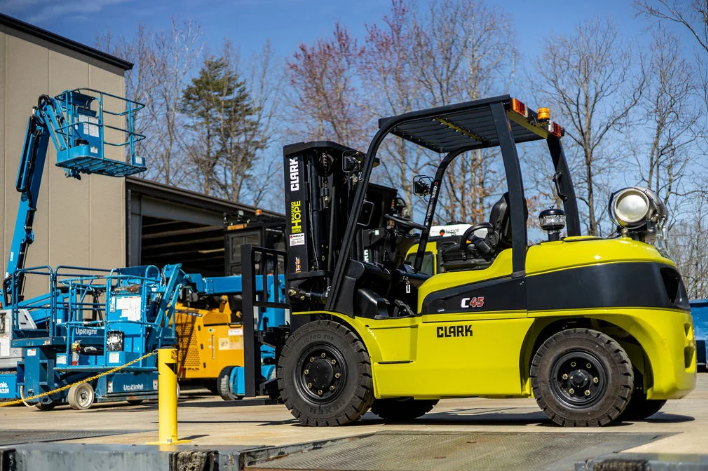
In modern industrial, warehouse, and construction operations, the ability to move, lift, and transport heavy materials efficiently is essential for maintaining productivity, reducing operational costs, and ensuring workplace safety. Traditional methods such as manual labor or relying solely on owned equipment may often prove insufficient, especially when workloads fluctuate, seasonal demands increase, or temporary projects require specialized machinery. In such scenarios, forklift rentals provide a practical and cost-effective solution that allows businesses to access high-quality, well-maintained equipment without the financial and logistical burdens of purchasing, storing, or maintaining forklifts long-term. Renting forklifts enables companies to respond dynamically to operational needs, scale their resources according to demand, and maintain smooth workflow processes while prioritizing worker safety and equipment reliability. By understanding the advantages, applications, safety protocols, and operational best practices associated with forklift rentals, businesses can make informed decisions that optimize efficiency, reduce risk, and improve overall productivity in their material-handling operations.
Forklifts are a critical component of modern material-handling infrastructure because they combine lifting capability, mobility, and operational precision, allowing operators to move heavy loads with minimal risk of injury or damage. These machines are indispensable for tasks such as warehouse inventory management, loading and unloading trucks, industrial assembly, construction site operations, and logistics management, where manual handling would be inefficient or unsafe. Properly executed forklift operations, combined with strategic rental solutions, provide a highly effective means of meeting the dynamic demands of modern industrial and warehouse environments while allowing businesses to maintain cost control and operational flexibility.
Understanding Forklift Rentals and How They Function
A forklift is a mechanized vehicle specifically designed to lift, carry, and transport heavy loads over short distances while maintaining stability and operator control. While purchasing forklifts may be suitable for some long-term projects, renting offers a strategic alternative that provides temporary access to the right equipment for specific operational needs. Forklift rentals typically include additional services such as delivery, maintenance, and technical support, ensuring that the machinery is safe, fully operational, and compliant with relevant safety standards throughout the rental period. Renting forklifts allows businesses to access specialized vehicles for short-term, seasonal, or fluctuating workloads without committing significant capital, which is particularly advantageous for companies seeking to optimize their operational budgets while maintaining the ability to scale resources as projects require.
Rental agreements are highly flexible, allowing businesses to select the duration of equipment use, whether it is for a single day, multiple weeks, or several months. Additionally, forklift rental providers often offer guidance on the selection of the most suitable forklift type, depending on factors such as indoor versus outdoor use, load capacity, reach, and operational environment. By leveraging these services, companies can ensure that they are using the right type of equipment for each specific task, minimizing risk, reducing downtime, and maximizing productivity. Providers that specialize in forklift rentals maintain fleets of well-serviced and modern forklifts, which allows businesses to rely on equipment that incorporates the latest safety features, ergonomic improvements, and operational efficiencies, ultimately supporting safer and more efficient workflow processes.
Types of Forklifts Available for Rent
Selecting the appropriate type of forklift is essential to ensure operational efficiency, safety, and cost-effectiveness, as forklifts are designed for different tasks, environments, and load capacities. Electric forklifts, for example, are ideal for indoor applications because they operate quietly, produce no emissions, and require minimal maintenance compared to internal combustion models. They are particularly suitable for warehouses, distribution centers, and retail operations where maintaining a clean, safe, and low-noise environment is critical. Internal combustion forklifts, powered by diesel, gasoline, or propane, provide higher lifting capacity and power, making them suitable for outdoor or heavy-duty applications such as construction sites, industrial yards, and loading docks. Rough terrain forklifts are built to handle uneven, unpaved, or challenging surfaces, featuring large tires, reinforced frames, and advanced suspension systems that ensure stability and safety while transporting heavy loads. Additionally, reach trucks and narrow-aisle forklifts are designed for confined spaces, offering vertical reach for high shelving or dense storage environments, which is especially beneficial for maximizing storage efficiency in modern warehouses and distribution centers. Partnering with a professional rental provider specializing in forklift rentals ensures that businesses select the most suitable equipment for their specific project requirements, allowing them to optimize workflow while maintaining safety standards.
Benefits of Forklift Rentals
Opting for forklift rentals rather than purchasing provides businesses with numerous advantages, particularly for temporary, seasonal, or variable operational needs. One of the most significant benefits is cost-effectiveness, as purchasing a forklift requires a considerable upfront investment, along with ongoing maintenance, insurance, and storage costs. Renting allows companies to access high-quality equipment without these financial burdens, enabling capital to be allocated to other operational priorities or investments. Flexibility is another advantage, as rental programs allow businesses to adjust their fleet size based on workload requirements. This is particularly valuable during periods of peak demand, seasonal projects, or when specialized forklifts are required for specific tasks.
Additionally, forklift rentals provide access to modern, well-maintained machinery equipped with advanced safety features, ergonomic improvements, and operational efficiencies, allowing operators to perform tasks more efficiently and comfortably. Rental providers also handle regular maintenance and inspections, ensuring the machinery remains safe and reliable while reducing downtime due to mechanical failures. By removing the responsibility of long-term storage for idle forklifts, businesses can also maximize space utilization within their facilities. These combined advantages make forklift rentals a highly strategic solution for companies seeking to optimize operations, manage costs effectively, and maintain a safe and efficient work environment.
Safety Considerations for Forklift Operation
Safety is the foremost priority when operating forklifts, and strict adherence to operational protocols is essential to prevent accidents and protect personnel. Proper operator training is critical, encompassing vehicle controls, maneuvering techniques, load handling, emergency procedures, and hazard identification. Certified training programs ensure operators are competent and capable of safely handling forklifts, which is particularly important when using rented equipment for temporary or high-demand projects.
Load capacity must always be observed, including both personnel and cargo, to prevent tipping, mechanical failure, or structural damage. Operators should maintain stability by keeping loads balanced, avoiding sudden movements, and carefully navigating inclines or uneven surfaces. Environmental awareness is also crucial, including monitoring for overhead obstacles, floor conditions, and potential hazards that could interfere with safe operation. Even with rented forklifts, pre-use inspections are recommended to identify mechanical issues or damage, ensuring that the equipment is safe and ready for use. Adhering to these safety measures reduces operational risk, enhances workflow efficiency, and ensures a secure working environment.
Choosing the Right Forklift Rental
Selecting the most suitable forklift requires careful evaluation of project-specific factors. Height and reach requirements determine whether the forklift can access all necessary areas, while weight capacity ensures the equipment can safely handle loads without exceeding rated limits. The operating environment, whether indoor, outdoor, rough terrain, or confined spaces, plays a critical role in determining forklift type. Rental duration should align with project timelines to ensure cost efficiency and equipment availability. Additional features, such as adjustable forks, pallet attachments, ergonomic enhancements, or safety systems, can further improve operational efficiency, precision, and worker comfort. Consulting with a specialized rental provider ensures that the right forklift is selected for the specific project needs, maximizing productivity while maintaining strict safety standards.
Operational and Maintenance Guidelines
Even when using rented forklifts, proper operational and maintenance practices are essential for safe, reliable, and efficient performance. Operators should conduct pre-use inspections to check for mechanical issues, structural damage, or missing components. Fuel or battery levels should be verified to ensure uninterrupted operation, and all safety systems, including brakes, alarms, and stabilizers, must be fully functional. Operators should maneuver forklifts with caution, maintain load balance, and avoid overloading the equipment to ensure stability and reduce the risk of accidents. Routine maintenance performed by rental providers ensures forklifts remain in optimal working condition, reducing downtime and supporting smooth operations. Following these guidelines enhances safety, extends the lifespan of rented equipment, and ensures the success of material-handling projects.
Conclusion: The Strategic Value of Forklift Rentals
For businesses seeking flexible, reliable, and cost-effective material-handling solutions, forklift rentals provide an essential tool that allows companies to manage fluctuating workloads, complete projects efficiently, and maintain high safety standards without the financial commitment of purchasing equipment. By selecting the appropriate forklift type, adhering to operational best practices, and following safety protocols, businesses can optimize productivity, reduce costs, and create a secure work environment. Partnering with professional providers specializing in forklift rentals ensures access to high-quality machinery, technical guidance, and maintenance support, enabling companies to meet the dynamic demands of modern warehouse, industrial, and construction operations. Whether for temporary projects, seasonal workload spikes, or specialized material-handling tasks, forklift rentals offer a flexible and efficient solution that supports operational success and long-term business growth.

When interest rates start to decline, homeowners often find themselves wondering whether it’s the perfect time to refinance. The truth is, refinancing can be a powerful financial strategy — if you do it smartly. Done right, refinancing when rates drop can help you lower monthly payments, reduce the total interest you pay, and even pay off your mortgage sooner.
In this in-depth guide, we’ll break down how to refinance wisely, avoid common pitfalls, and position yourself to maximize the benefits of lower rates.
📌 1. Understand What Refinancing Actually Means
Refinancing means replacing your existing mortgage with a new one, usually with better terms. Most homeowners refinance to get a lower interest rate, but there are other motivations too, such as:
- Switching from an adjustable-rate mortgage (ARM) to a fixed-rate mortgage for stability
- Reducing the loan term (e.g., from 30 years to 15 years)
- Accessing home equity through a cash-out refinance
- Removing private mortgage insurance (PMI) if your home value has increased
✅ Pro Tip: Use a trusted mortgage comparison platform like Bankrate to quickly check today’s refinance rates and compare multiple lenders.
📉 2. Watch Interest Rate Trends Closely
Timing is everything when it comes to refinancing. If rates have fallen by 0.5% or more compared to your original mortgage rate, it may be worth refinancing. However, even a 0.25% drop can make sense depending on your loan amount and how long you plan to stay in the home.
Keep an eye on the Federal Reserve’s announcements, economic reports, and mortgage rate forecasts. Remember: mortgage rates often react ahead of Fed rate cuts or hikes, so acting quickly can give you an edge.
You can track daily mortgage trends easily at Mortgage News Daily to stay informed.
🧮 3. Calculate Your Break-Even Point
Even if rates drop, refinancing isn’t free. You’ll typically pay 2%–5% of the loan amount in closing costs, which may include:
- Application fees
- Appraisal costs
- Title search & insurance
- Origination fees
To know whether refinancing is financially smart, calculate your break-even point — the time it takes for your monthly savings to exceed the refinancing costs.
For example:
- Closing costs = $4,000
- Monthly savings = $200
- Break-even point = 20 months ($4,000 ÷ $200)
If you plan to stay in your home longer than the break-even point, refinancing is likely worth it.
You can use a free refinance calculator on NerdWallet to run your numbers quickly.
📝 4. Strengthen Your Financial Profile Before Applying
Just because rates have dropped doesn’t guarantee you’ll qualify for the best deals. Lenders look at several factors to determine the interest rate you’re offered, including:
- Credit Score: Aim for 700+ for the most competitive rates.
- Debt-to-Income Ratio (DTI): Keep it below 43% if possible.
- Home Equity: At least 20% equity gives you stronger negotiating power.
- Employment History: A stable income and job history make you less risky.
Take a few months to boost your credit score, pay down high-interest debt, and gather all documentation (W-2s, bank statements, pay stubs) to present a strong application.
🏦 5. Shop Around — Don’t Just Go With Your Current Lender
A common mistake homeowners make is refinancing through their existing lender without shopping around. While your current lender may offer some loyalty perks, you might find significantly better terms elsewhere.
Request Loan Estimates from at least 3–5 different lenders, and compare:
- Interest rates
- Loan terms (15 vs. 30 years)
- Closing costs
- Prepayment penalties
- Overall annual percentage rate (APR)
Competition between lenders can sometimes lead to rate matching or even lowering fees — which means more savings for you.
⚖️ 6. Consider the Loan Term Carefully
Lower rates often make shorter-term loans (like 15-year mortgages) more affordable. For example, switching from a 30-year to a 15-year loan at a lower rate might increase your monthly payment slightly but save you tens of thousands in interest over the life of the loan.
Alternatively, if you need lower monthly payments to ease cash flow, refinancing into a new 30-year mortgage could reduce your payment significantly — though it may cost more in interest long-term.
The best approach depends on your financial goals and how long you plan to stay in the home.
💰 7. Lock in Your Rate Strategically
When you apply to refinance, lenders typically offer a rate lock, usually for 30–60 days. This guarantees your interest rate won’t change during that period, even if market rates fluctuate.
However, if you expect rates to drop further, you might float your rate — but this comes with risk. If rates rise unexpectedly, you could end up with a higher rate than initially offered.
Many lenders also offer a “float-down” option, allowing you to lock in today but take advantage of lower rates if they fall before closing. Be sure to ask about this feature.
🚫 8. Avoid Common Refinancing Mistakes
Even savvy homeowners can make missteps when refinancing. Avoid these pitfalls:
- Extending your loan unnecessarily: Don’t restart a 30-year term if you’ve already paid off 10 years — unless cash flow is your top priority.
- Ignoring fees and fine print: Low advertised rates often come with high closing costs.
- Not checking your credit report: Errors can hurt your approval chances and cost you a better rate.
- Failing to plan for future moves: If you plan to sell your home soon, refinancing may not make financial sense.
🌟 9. Leverage Cash-Out Refinancing Wisely
If your home has appreciated in value, you might consider a cash-out refinance to access some of that equity. This can be a smart way to:
- Pay off high-interest debt
- Fund home improvements
- Invest in other assets
However, remember that you’re increasing your loan balance, and you’ll be paying interest on that cash. Make sure the borrowed amount is used for high-impact financial purposes — not short-term expenses.
📝 10. Prepare for a Smoother Closing
Once you’ve selected a lender and locked in a rate, the refinancing process usually takes 30–45 days. To speed things up:
- Respond to all document requests quickly
- Be ready for a home appraisal
- Avoid taking on new debt during the process
- Keep your financial situation stable until closing
🧠 Final Thoughts: Refinance Strategically, Not Impulsively
Refinancing when rates drop can be a powerful financial tool — but only if approached thoughtfully. Take time to calculate your break-even point, strengthen your financial profile, compare offers, and choose terms that align with your goals.
A smart refinance can help you:
- Lower your monthly payments
- Pay off your home faster
- Build equity more efficiently
- Save thousands in interest
As with any major financial decision, do your research, consult trusted professionals, and never rush into signing anything you don’t fully understand.


How Family Support Encourages Meaningful Change
Family support plays a powerful role in helping individuals move through challenging periods. When someone is struggling, the people closest...


Why Mirror Lights and Pendant Fixtures Are a Must for Modern Homes
Lighting is no longer just about visibility—it’s a key part of interior design. Modern homes rely on a combination of...


The Power of UGC Video Creators in Influencer Marketing
In today’s world of marketing, one of the most significant shifts has been the rise of User-Generated Content (UGC). While...


How Online CNC Turning Services Achieve 30% Cost Savings Without Compromising Speed or Quality
Introduction In today’s competitive market, product development teams and procurement engineers face a common problem: pay a high premium to...


Avoiding Costly Mistakes: A Scientific Guide to Selecting the Best Material for Your Custom Gear Systems
Introduction In the area of mechanical engineering, experts are generally confronted with the classic trade-off problem when designing custom gear...


Labarty: Hidden Gems and Off-the-Beaten-Path Spots
Nestled away from the bustling tourist trails, Labarty is a treasure waiting to be uncovered. This charming destination boasts stunning...


How Much Is Cost Segregation Study? A Practical Pricing Guide for Real Estate Owners
If you own income-producing real estate, you’ve probably heard that a cost segregation study can accelerate depreciation and unlock meaningful...


How Custom Development Enables Scalable Digital Transformation
Digital transformation is no longer a short-term initiative. It is an ongoing process that needs systems capable of growing alongside...

How Long Does It Take to Be a Surgical Tech
If you’re asking how long it takes to be a surgical tech, you’re likely trying to plan your next move...

The Comprehensive Guide to Forklift Rentals: Enhancing Efficiency, Safety, and Flexibility in Industrial and Warehouse Operations
In modern industrial, warehouse, and construction operations, the ability to move, lift, and transport heavy materials efficiently is essential for...
-

 Guide10 months ago
Delta Flight DL275 Diverted to LAX – What Happened?
-

 Technology8 months ago
The Importance of User Feedback Loops in AI Slide Builders
-

 Social Media10 months ago
Go Viral Overnight: Proven Instagram Power Moves to Beat the Algorithm
-

 Social Media10 months ago
Going Viral in the Digital Age: Meaning, Importance, and Practical Tips
-

 How to10 months ago
How to Turn Instagram Followers into Real Customers
-

 Social Media10 months ago
7 Powerful Tips to Reach More People on Facebook (Without Spending a Fortune)
-
Viral Tips2 years ago
Make Money Online from Home 2024
-
 How to10 months ago
Viral Tips Online – How to Blow Up on TikTok Fast